

What is that?
Pay by Link is a feature that allows you to generate a unique payment link and a Multibanco Reference for each invoice. This link can be sent by email or printed on the invoice, allowing customers to make payment quickly and easily through a payment gateway.
The main benefits of Pay by Link are:
The main benefits of Pay by Link are:
- Simplicity: Eliminates the need for complex payment methods, allowing the customer to pay with just a few clicks.
- Speed: Facilitates cash flow, as payment can be made immediately after receiving the invoice.
Who provides Pay By Link?
Ifthenpay (ifthenpay.com) is the company responsible for providing the necessary infrastructure for the implementation of Pay By Link in weoInvoice, providing a payment gateway that supports several methods (Multibanco Reference, MB Way, credit cards, Google Pay, Apple Pay, among others), ensuring security and efficiency in transactions.
With a consolidated presence in the Portuguese market, Ifthenpay is a Payment Institution authorized and supervised by the Bank of Portugal (registration number 8707) and offers modern and reliable solutions for online payments, which weoInvoice has added to make available to all its users.
With a consolidated presence in the Portuguese market, Ifthenpay is a Payment Institution authorized and supervised by the Bank of Portugal (registration number 8707) and offers modern and reliable solutions for online payments, which weoInvoice has added to make available to all its users.
What are the conditions for using Pay By Link?
The use of Ifthenpay's Pay By Link service, integrated with weoInvoice to receive payments, is subject to the terms and conditions indicated in the Ifthenpay membership agreement which you can see here.
The generation of the payment link is available in all weoInvoice plans, with all users having access to this functionality through the 'Generate Pay By Link' button, available on any closed, unpaid and non-cancelled invoice.
The service only becomes effective after the subscription contract has been sent to Ifthenpay, duly completed, signed and accompanied by the documents indicated therein, and after acceptance by Ifthenpay itself.
The transfer of funds relating to payments can only be carried out after the documents have been validated and the contract has been accepted by ifthenpay.
For more detailed information about the conditions of the Pay By Link service provided by Ifthenpay, please contact us by email at suporte@ifthenpay.com or by phone at 227 660 871 and 808 222 777
weoInvoice has no responsibility for the processes of acceptance and validation of the membership contract and transfer of resources, which are the sole responsibility of Ifthenpay and the user.
The generation of the payment link is available in all weoInvoice plans, with all users having access to this functionality through the 'Generate Pay By Link' button, available on any closed, unpaid and non-cancelled invoice.
The service only becomes effective after the subscription contract has been sent to Ifthenpay, duly completed, signed and accompanied by the documents indicated therein, and after acceptance by Ifthenpay itself.
The transfer of funds relating to payments can only be carried out after the documents have been validated and the contract has been accepted by ifthenpay.
For more detailed information about the conditions of the Pay By Link service provided by Ifthenpay, please contact us by email at suporte@ifthenpay.com or by phone at 227 660 871 and 808 222 777
weoInvoice has no responsibility for the processes of acceptance and validation of the membership contract and transfer of resources, which are the sole responsibility of Ifthenpay and the user.
Pay by Link on weoInvoice
The Pay By Link option is available, in all weoInvoice plans, when viewing unpaid and uncancelled invoices.
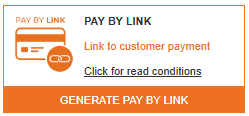
You can generate the payment link (Pay by Link) through the 'Generate Pay By Link' button, located below the invoice summary.
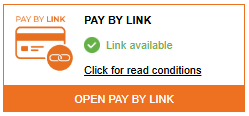
After generating the link, you can deliver it to your customer in 2 ways:
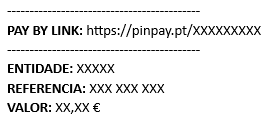
1. Invoice PDF: The link will automatically be printed on the invoice PDF you generate using the 'Print' option.
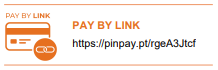
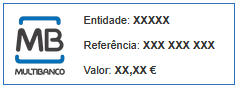
2. Invoice Email: The link will be automatically included at the end of the email message you send to your customer using the 'Email' option.
(available only on the Exclusive Plus+ plan)
After the customer makes the payment through Pay by Link, you will have, for total control of the process:
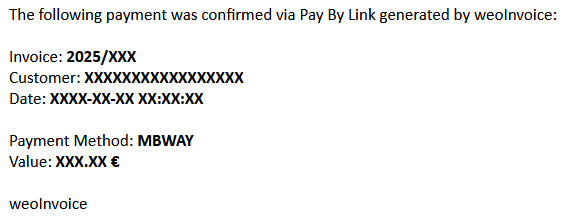
1. Confirmation email: You will receive an email from weoInvoice, at the email address associated with your account, confirming the payment details and the settled invoice.
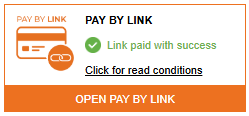
2. Link Status: In the invoice view, you will find that the Pay By Link payment has been made.
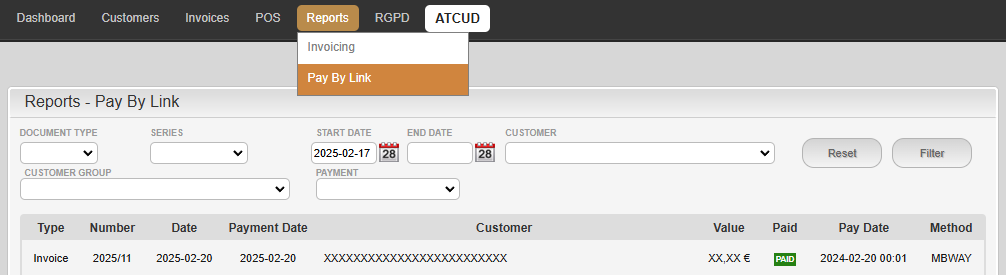
3. Report: You have available, in the Reports menu of your account, a list that you can consult with the generated links and the payment status of each invoice with generated links.
If you have any questions, please do not hesitate to contact us by email at helpdesk@weoinvoice.es.
weoInvoice Team
You can generate the payment link (Pay by Link) through the 'Generate Pay By Link' button, located below the invoice summary.
After generating the link, you can deliver it to your customer in 2 ways:
1. Invoice PDF: The link will automatically be printed on the invoice PDF you generate using the 'Print' option.
2. Invoice Email: The link will be automatically included at the end of the email message you send to your customer using the 'Email' option.
(available only on the Exclusive Plus+ plan)
After the customer makes the payment through Pay by Link, you will have, for total control of the process:
1. Confirmation email: You will receive an email from weoInvoice, at the email address associated with your account, confirming the payment details and the settled invoice.
2. Link Status: In the invoice view, you will find that the Pay By Link payment has been made.
3. Report: You have available, in the Reports menu of your account, a list that you can consult with the generated links and the payment status of each invoice with generated links.
As indicated, the receipt of funds relating to payments will be the responsibility of Ifthenpay,
in accordance with the provisions of the contract entered into in the meantime.
in accordance with the provisions of the contract entered into in the meantime.
If you have any questions, please do not hesitate to contact us by email at helpdesk@weoinvoice.es.
weoInvoice Team
